|
|
Electronic Newsroom, EAS Alerts & Wire Service Capture |
FileLog
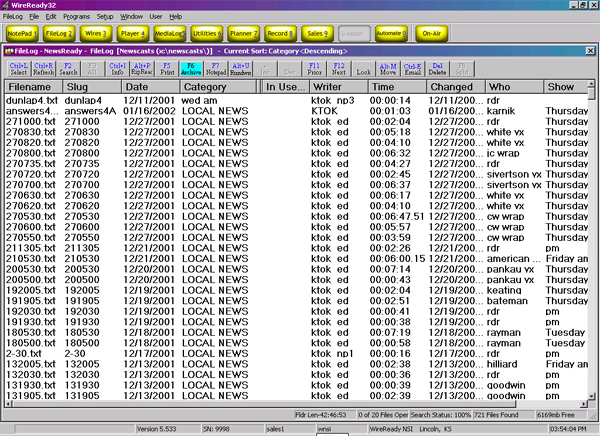
After you've spent time and effort on a story - the last thing you want is to lose it in a "black hole" where you waste valuable time trying to hunt it down or it is never to be seen again. With the FileLog - you can manage saved files in a variety of custom folders - including day folders - specific-show folders - phone books and other information systems. Think of it as a modern version of the old "tray" or "clipboard" filing system.
Organizing your work so you can find it again - fast
After you've spent time and effort on a story, the last thing you want is to lose it in a "black hole," where you waste valuable time trying to hunt it down, or it is never to be seen again.
With the FileLog, you can manage saved files in a variety of custom folders, including day folders, specific-show folders, phone books, and other information systems. Custom folders can be created by your systems administrator. Think of it as a modern version of the old "tray" or "clipboard" filing system.
Stories are saved in chronological order, with the most recent going to the top of the list. For fast access, you can take advantage of a search feature similar to that in the WireBrowser. To rework a story from the FileLog, simply double-click the headline.
To switch folders at any time within the FileLog, click Select from the FileLog toolbar.
Archive vs. Save
Archiving a file is similar to Saving it. Both options make use of the FileLog system, and function almost identically when it comes to naming the file and choosing a destination folder. A critical difference is the overwrite safety feature that is built into the Archive option. If you work on a story that has the same file name as one that has already been saved to a particular custom folder, upon choosing Save you will be asked if you wish to overwrite or replace the previous story. This prevents the confusion that can arise from having several files with the same name.
However, if you choose to Archive, files with identical names are not overwritten. They instead retain their slug names and are differentiated by the time, date, and name of writer that are added automatically. Since multiple users may be accessing the same file at once, Archive prevents multiple users from erasing each other's stories.
This page created by WebReady - Powered by WireReady NSI
|
|